Join the AI Workshop and learn to build real-world apps with AI. A hands-on, practical program to level up your skills.
The Speech Synthesis API is a powerful tool provided by modern browsers.
Introduced in 2014, it’s now widely adopted and available in Chrome, Firefox, Safari and Edge. IE is not supported.
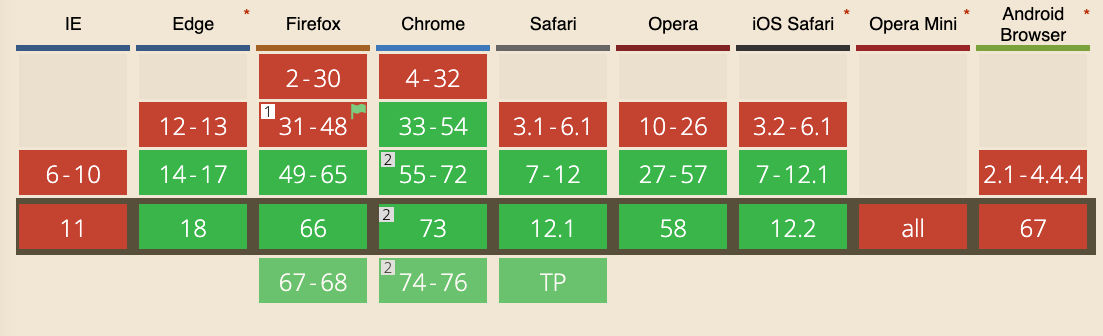
It’s part of the Web Speech API, along with the Speech Recognition API, although that is currently only supported in experimental mode on Chrome.
One use case is providing spoken alerts on a page that monitors parameters—for example, when a value goes above a threshold, the computer can speak a warning.
Getting started
The simplest example of using the Speech Synthesis API is a single line:
speechSynthesis.speak(new SpeechSynthesisUtterance('Hey'))Paste it into your browser console and your computer will speak.
The API
The API exposes several objects to the window object.
SpeechSynthesisUtterance
SpeechSynthesisUtterance represents a speech request. In the example above we passed it a string. That’s the message the browser should read aloud.
Once you have the utterance object, you can adjust the speech properties:
const utterance = new SpeechSynthesisUtterance('Hey')utterance.rate: sets the speed; accepts values from 0.1 to 10; default is 1utterance.pitch: sets the pitch; accepts values from 0 to 2; default is 1utterance.volume: sets the volume; accepts values from 0 to 1; default is 1utterance.lang: sets the language (BCP 47 tag, e.g.en-USorit-IT)utterance.text: the text to speak; can be set here instead of in the constructor; maximum 32,767 charactersutterance.voice: sets the voice (see below)
Example:
const utterance = new SpeechSynthesisUtterance('Hey')
utterance.pitch = 1.5
utterance.volume = 0.5
utterance.rate = 8
speechSynthesis.speak(utterance)
Set a voice
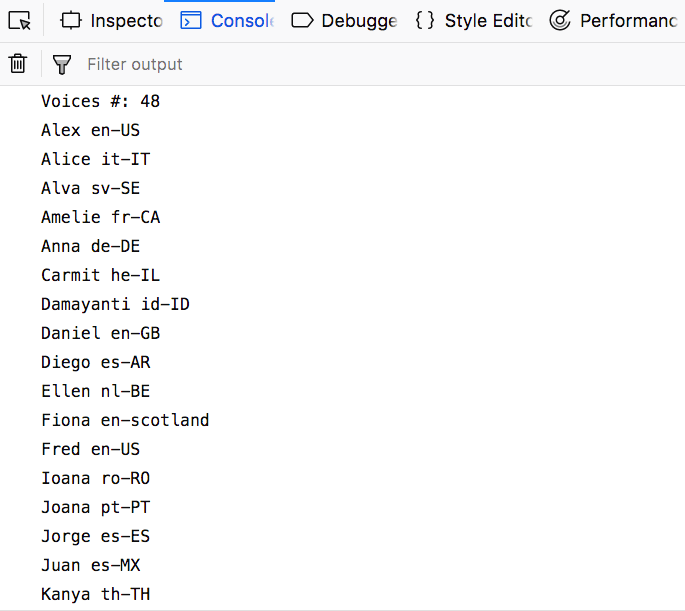
The browser has a different number of voices available.
To see the list, use this code:
console.log(`Voices #: ${speechSynthesis.getVoices().length}`)

speechSynthesis.getVoices().forEach((voice) => {
  console.log(voice.name, voice.lang)
})
There is a cross-browser difference: the code above works in Firefox and Safari (and possibly Edge), but not in Chrome. Chrome loads voices asynchronously and requires a callback that runs when voices are ready:
const voiceschanged = () => {
  console.log(`Voices #: ${speechSynthesis.getVoices().length}`)
  speechSynthesis.getVoices().forEach((voice) => {
    console.log(voice.name, voice.lang)
  })
}
speechSynthesis.onvoiceschanged = voiceschanged
After the callback is called, we can access the list using speechSynthesis.getVoices().
This is likely because Chrome, when a network connection is available, fetches additional voices from Google’s servers:
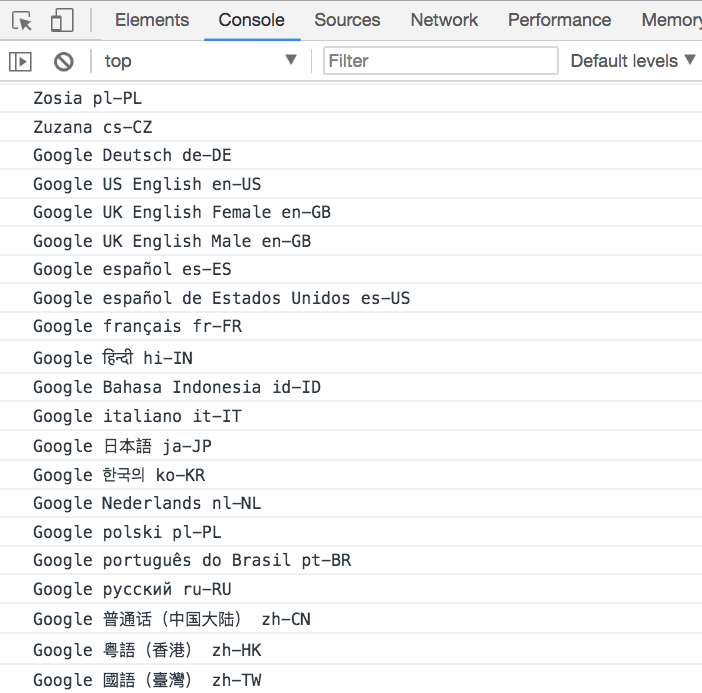
Without a network connection, the set of voices matches Firefox and Safari. The API works offline; extra voices are only available when online.
Cross-browser implementation to get the voices
Because of this difference, we need a small abstraction. This example provides it:
const getVoices = () => {
  return new Promise((resolve) => {
    let voices = speechSynthesis.getVoices()
    if (voices.length) {
      resolve(voices)
      return
    }
    speechSynthesis.onvoiceschanged = () => {
      voices = speechSynthesis.getVoices()
      resolve(voices)
    }
  })
}

const printVoicesList = async () => {
  ;(await getVoices()).forEach((voice) => {
    console.log(voice.name, voice.lang)
  })
}

printVoicesList()Use a custom language
The default voice speaks in English.
You can use any language you want, by setting the utterance lang property:
let utterance = new SpeechSynthesisUtterance('Ciao')
utterance.lang = 'it-IT'
speechSynthesis.speak(utterance)
Use another voice
If more than one voice is available for a language, you can pick a different one. For example, the default Italian voice may be female; the second voice in the list might be male.
const lang = 'it-IT'
const voiceIndex = 1

const speak = async (text) => {
  if (!speechSynthesis) {
    return
  }
  const message = new SpeechSynthesisUtterance(text)
  message.voice = await chooseVoice()
  speechSynthesis.speak(message)
}

const getVoices = () => {
  return new Promise((resolve) => {
    let voices = speechSynthesis.getVoices()
    if (voices.length) {
      resolve(voices)
      return
    }
    speechSynthesis.onvoiceschanged = () => {
      voices = speechSynthesis.getVoices()
      resolve(voices)
    }
  })
}

const chooseVoice = async () => {
  const voices = (await getVoices()).filter((voice) => voice.lang == lang)

  return new Promise((resolve) => {
    resolve(voices[voiceIndex])
  })
}

speak('Ciao')Values for the language
Those are some examples of the languages you can use:
- Arabic (Saudi Arabia) ➡️
ar-SA - Chinese (China) ➡️
zh-CN - Chinese (Hong Kong SAR China) ➡️
zh-HK - Chinese (Taiwan) ➡️
zh-TW - Czech (Czech Republic) ➡️
cs-CZ - Danish (Denmark) ➡️
da-DK - Dutch (Belgium) ➡️
nl-BE - Dutch (Netherlands) ➡️
nl-NL - English (Australia) ➡️
en-AU - English (Ireland) ➡️
en-IE - English (South Africa) ➡️
en-ZA - English (United Kingdom) ➡️
en-GB - English (United States) ➡️
en-US - Finnish (Finland) ➡️
fi-FI - French (Canada) ➡️
fr-CA - French (France) ➡️
fr-FR - German (Germany) ➡️
de-DE - Greek (Greece) ➡️
el-GR - Hindi (India) ➡️
hi-IN - Hungarian (Hungary) ➡️
hu-HU - Indonesian (Indonesia) ➡️
id-ID - Italian (Italy) ➡️
it-IT - Japanese (Japan) ➡️
ja-JP - Korean (South Korea) ➡️
ko-KR - Norwegian (Norway) ➡️
no-NO - Polish (Poland) ➡️
pl-PL - Portuguese (Brazil) ➡️
pt-BR - Portuguese (Portugal) ➡️
pt-PT - Romanian (Romania) ➡️
ro-RO - Russian (Russia) ➡️
ru-RU - Slovak (Slovakia) ➡️
sk-SK - Spanish (Mexico) ➡️
es-MX - Spanish (Spain) ➡️
es-ES - Swedish (Sweden) ➡️
sv-SE - Thai (Thailand) ➡️
th-TH - Turkish (Turkey) ➡️
tr-TR
Mobile
On iOS the API works but must be triggered by a user action (e.g. a tap), to avoid unexpected sound and improve the experience.
Unlike on desktop, you cannot make the page speak without a user gesture.