Join the AI Workshop and learn to build real-world apps with AI. A hands-on, practical program to level up your skills.
When you install a package using npm install <packagename>, the latest available version of the package is downloaded and put in the node_modules folder, and a corresponding entry is added to the package.json and package-lock.json files that are present in your current folder.
npm calculates the dependencies and installs the latest available version of those as well.
Let’s say you install cowsay, a cool command line tool that lets you make a cow say things.
When you npm install cowsay, this entry is added to the package.json file:
{
  "dependencies": {
    "cowsay": "^1.3.1"
  }
}
and this is an extract of package-lock.json, where I removed the nested dependencies for clarity:
{
  "requires": true,
  "lockfileVersion": 1,
  "dependencies": {
    "cowsay": {
      "version": "1.3.1",
      "resolved": "https://registry.npmjs.org/cowsay/-/cowsay-1.3.1.tgz",
      "integrity": "sha512-3PVFe6FePVtPj1HTeLin9v8WyLl+VmM1l1H/5P+BTTDkMAjufp+0F9eLjzRnOHzVAYeIYFF5po5NjRrgefnRMQ==",
      "requires": {
        "get-stdin": "^5.0.1",
        "optimist": "~0.6.1",
        "string-width": "~2.1.1",
        "strip-eof": "^1.0.0"
      }
    }
  }
}
Now those 2 files tell us that we installed version 1.3.1 of cowsay, and our rule for updates is ^1.3.1, which for the npm versioning rules means that npm can update to patch and minor releases: 1.3.2, 1.4.0 and so on.
But not for major version changes that break compatibility, which means, in this example, 2.0 and higher.
If there is a new minor or patch release and we type npm update, the installed version is updated, and the package-lock.json file is diligently updated with the new version.
package.json remains unchanged.
To discover new releases of the packages, you run npm outdated.
Example output of outdated packages:
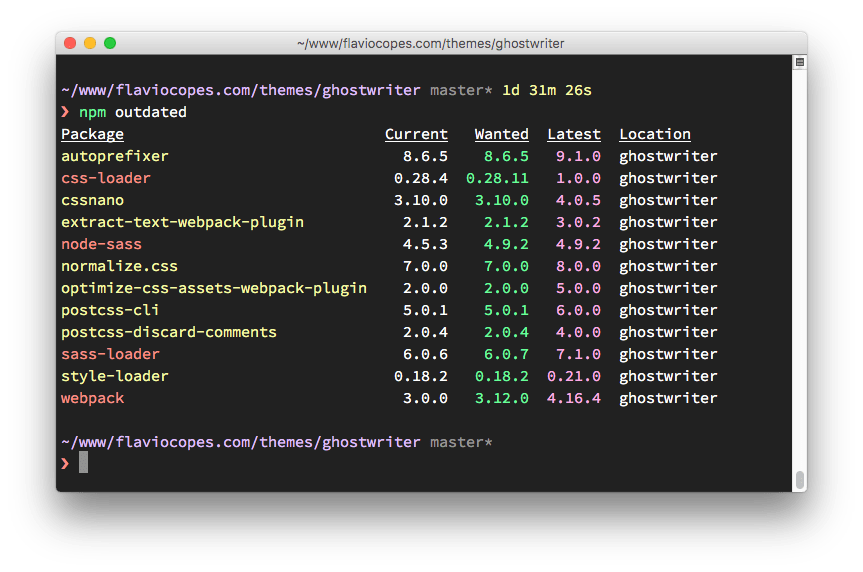
Some listed updates are major releases. npm update does not install those, because major versions can introduce breaking changes.
To update all packages to a new major version, install the npm-check-updates package globally:
npm install -g npm-check-updatesthen run it:
ncu -uThis updates the version ranges in package.json (dependencies and devDependencies) so npm can install the new major versions.
You are now ready to run the update:
npm updateIf you cloned the project without node_modules and want to install the updated versions, run
npm install