Tips: How to deep copy JavaScript objects using structuredClone

Join the AI Workshop to learn more about AI and how it can be applied to web development. Next cohort February 1st, 2026

The AI-first Web Development BOOTCAMP cohort starts February 24th, 2026. 10 weeks of intensive training and hands-on projects.


For years and years we’ve had to use weird workarounds to do a deep clone of a JavaScript object.

Many of those were bug prone.

Like doing JSON.parse(JSON.stringify(obj)) where some types are be ignored.

Or worse, copying object properties by reference, introducing bugs down the road.

Today we have structuredClone() and it’s part of the DOM API.

It’s not part of JavaScript, it’s a DOM API.

It’s available in recent versions of all modern browsers:
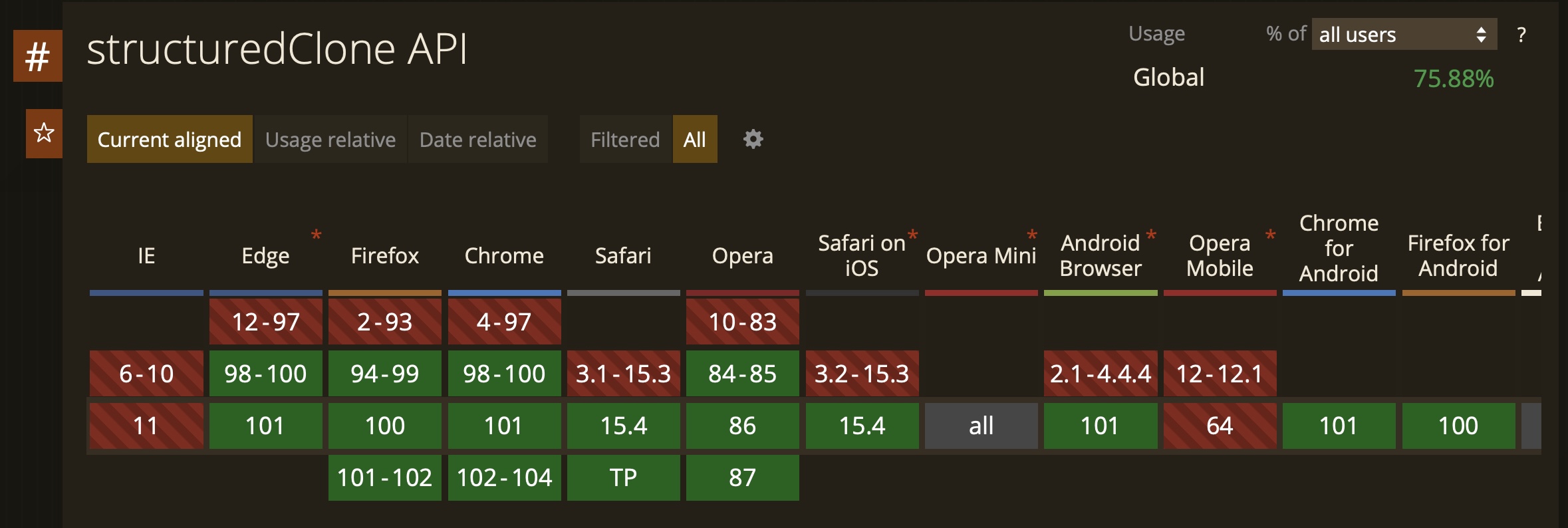
It’s also available in Node.js 17+.

Lessons in this unit:

0: Introduction
1: Axios crashes the Node.js process when the request fails
2: How to set up a cron job that runs a Node.js app
3: How to get both parsed body and raw body in Express
4: Interact with the Google Analytics API using Node.js
5: How to bulk convert file names using Node.js
6: ▶︎ How to deep copy JavaScript objects using structuredClone
7: How to handle file uploads in Node.js
8: How to send an email using nodemailer
9: Logging all the requests coming through an Express app
10: How to upload an image to S3 using Node.js
11: How to read a CSV file with Node.js
12: How to set the current working directory of a Node.js program
13: How to upload files to S3 from Node.js
14: How to write a CSV file with Node.js
15: Where to host a Node.js app
16: Parsing JSON with Node.js
17: nodemailer, how to embed an image into an email
18: The Pug Guide
19: Restarting a Node process without file changes
20: How to use Sequelize to interact with PostgreSQL