Join the AI Workshop and learn to build real-world apps with AI. A hands-on, practical program to level up your skills.
Streams let you receive data from the network (or other sources) and process it as it arrives, instead of waiting for the full resource to download.
What is a stream?
For example, you can start watching a video before it has fully loaded, or consume live data whose end is unknown. Content can even be generated indefinitely.
The Streams API
The Streams API lets you work with this kind of content. There are two modes: reading from a stream and writing to a stream.
Readable streams are supported in all modern browsers except Internet Explorer. Writable streams are not yet supported in Firefox and Internet Explorer. Check caniuse.com for current support.
Readable streams
Readable streams involve three main types:
ReadableStreamReadableStreamDefaultReaderReadableStreamDefaultController
Example: the Fetch API exposes the response body as a stream:
const stream = fetch('/resource').then((response) => response.body)The response’s body property is a ReadableStream. Call getReader() on it to get a ReadableStreamDefaultReader:
const reader = fetch('/resource').then((response) => response.body.getReader())You read data in chunks (bytes or typed arrays) with the read() method. Once a reader is created, the stream is locked to that reader until releaseLock() is called.
You can tee a stream to achieve this effect; more on this later.
Reading data from a readable stream
Example: read the first chunk of a response body (run in DevTools on the same origin to avoid CORS):
fetch('/').then((response) => {
  response.body
    .getReader()
    .read()
    .then(({ value, done }) => {
      console.log(value)
    })
})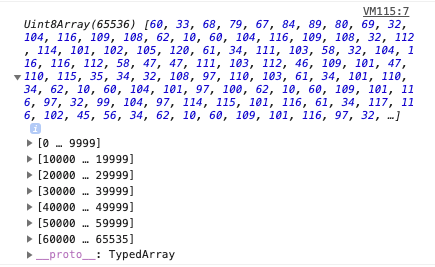
The value is a Uint8Array of bytes:
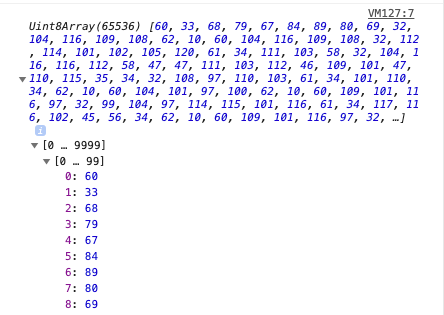
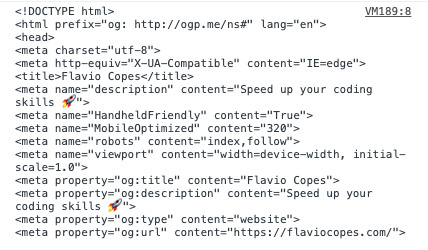
Decode bytes to text with the Encoding API:
const decoder = new TextDecoder('utf-8')
fetch('/').then((response) => {
  response.body
    .getReader()
    .read()
    .then(({ value, done }) => {
      console.log(decoder.decode(value))
    })
})
This prints the decoded characters:
Example: read the entire stream:
;(async () => {
  const fetchedResource = await fetch('/')
  const reader = await fetchedResource.body.getReader()

  let charsReceived = 0
  let result = ''

  reader.read().then(function processText({ done, value }) {
    if (done) {
      console.log('Stream finished. Content received:')
      console.log(result)
      return
    }

    console.log(`Received ${result.length} chars so far!`)

    result += value

    return reader.read().then(processText)
  })
})()
An async IIFE is used so we can use await. The processText callback receives an object with two properties: done (true when the stream has ended) and value (the current chunk). The function is called recursively until the stream is done.
Creating a stream
Warning: not supported in Edge and Internet Explorer
You can also create your own readable streams. Example:
const stream = new ReadableStream()An empty stream is not useful until you add data. Pass an object with these optional methods:
start(controller)— called when the stream is createdpull(controller)— called to enqueue more datacancel(reason)— called when the stream is cancelled
Minimal example:
const stream = new ReadableStream({
  start(controller) {},
  pull(controller) {},
  cancel(reason) {},
})
start() and pull() receive a ReadableStreamDefaultController. Call controller.enqueue() to add data:
const stream = new ReadableStream({
  start(controller) {
    controller.enqueue('Hello')
  },
})
Call controller.close() to close the stream. cancel() receives the reason passed to ReadableStream.cancel().
An optional second argument sets the queuing strategy (highWaterMark and size()). These control backpressure: when highWaterMark is reached, the stream signals upstream to slow down. Two built-in strategies:
ByteLengthQueuingStrategy— triggers when total byte size exceeds the markCountQueuingStrategy— triggers when chunk count exceeds the mark
Example: setting a 32 KB high water mark:
new ByteLengthQueuingStrategy({ highWaterMark: 32 * 1024 })Example: setting a 1-chunk high water mark:
new CountQueuingStrategy({ highWaterMark: 1 })You can control backpressure and flow; see the Streams spec for more. To allow multiple readers, use tee() to duplicate the stream:
const stream = //...
const tees = stream.tee()
tee() returns an array of two new streams (tees[0] and tees[1]).
Writable streams
Writable streams involve three main types:
WritableStreamWritableStreamDefaultWriterWritableStreamDefaultController
Create a WritableStream to write data to. Example:
const stream = new WritableStream()Pass an object with these optional methods: start(controller), write(chunk, controller), close(controller), abort(reason). Skeleton:
const stream = new WritableStream({
  start(controller) {},
  write(chunk, controller) {},
  close(controller) {},
  abort(reason) {},
})start(), write(), and close() receive a WritableStreamDefaultController. A second argument can set the queuing strategy, as with ReadableStream. Example: a writable stream that decodes bytes to a string. Create a TextDecoder:
const decoder = new TextDecoder('utf-8')Create a WritableStream with write() and close():
const writableStream = new WritableStream({
  write(chunk) {
    //...
  },
  close() {
    console.log(`The message is ${result}`)
  },
})
In write(), decode the chunk and append to a result string declared outside:
let result

const writableStream = new WritableStream({
  write(chunk) {
    const buffer = new ArrayBuffer(2)
    const view = new Uint16Array(buffer)
    view[0] = chunk
    const decoded = decoder.decode(view, { stream: true })
    result += decoded
  },
  close() {
    //...
  },
})
Client code: get a writer from the stream:
const writer = writableStream.getWriter()Encode and write the message. Use TextEncoder to encode:
const encoder = new TextEncoder()
const encoded = encoder.encode(message, { stream: true })
Write each chunk when the writer is ready:
encoded.forEach((chunk) => {
  writer.ready.then(() => {
    return writer.write(chunk)
  })
})
Close the writer when done:
writer.ready.then(() => {
  writer.close()
})Lessons in this unit:
| 0: | Introduction |
| 1: | The Fetch API |
| 2: | XMLHttpRequest |
| 3: | CORS |
| 4: | ▶︎ Streams API |