Join the AI Workshop and learn to build real-world apps with AI. A hands-on, practical program to level up your skills.
Every file/directory in an Operating System like Linux or macOS (and every UNIX system in general) has an owner.
The owner of a file can do everything with it. It can decide the fate of that file.
The owner (and the root user) can change the owner to another user, too, using the chown command:
chown <owner> <file>Like this:
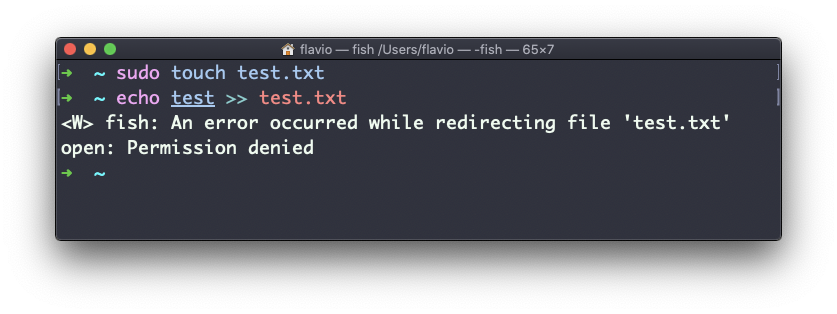
chown flavio test.txtFor example if you have a file that’s owned by root, you can’t write to it as another user:
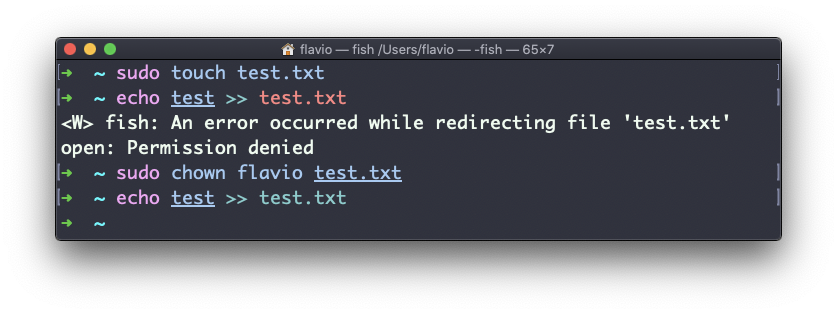
You can use chown to transfer the ownership to you:
It’s rather common to have the need to change the ownership of a directory, and recursively all the files contained, plus all the subdirectories and the files contained in them, too.
You can do so using the -R flag:
chown -R <owner> <file>Files/directories don’t just have an owner, they also have a group. Through this command you can change that simultaneously while you change the owner:
chown <owner>:<group> <file>Example:
chown flavio:users test.txtYou can also just change the group of a file using the chgrp command:
chgrp <group> <filename>The
chowncommand works on Linux, macOS, WSL, and anywhere you have a UNIX environment