Join the AI Workshop and learn to build real-world apps with AI. A hands-on, practical program to level up your skills.
I ran into a somewhat fun issue.
On the courses page I started listing the courses I organize, each with a form.
Forms are both protected using recaptcha, and the way recaptcha works is that it needs a function name to be called upon “return” (callback) of the validation process.
I used this same code for years but it’s probably the first time I’ve run two forms on the same page.
Having two forms on the page means I cannot use the same function callback name.
However the form is in an Astro reusable component.
I thought about using a random name that’s generated any time a component is used.
To do so I had to create a random function name, using the global object.
It’s an old trick, it just took me a couple of minutes to figure out if this was the correct way to have a dynamic function name (this is by far the easiest approach I came across).
Instead of:
function onSubmit() {
  //...
}
I used:
globalThis['onSubmit' + rand] = function() {
  //...
}
globalThis points to the window object in the browser environment.
rand is the random value; I generate it server-side when the component is created (through Astro), then pass it to the client-side script using define-vars:
---
const rand = Math.random().toString(36).substr(2, 9)
---

<script is:inline define:vars={{ rand }}>
    window['onSubmit' + rand] = function() {
        document.getElementById('form-' + rand).submit()
    }
</script>
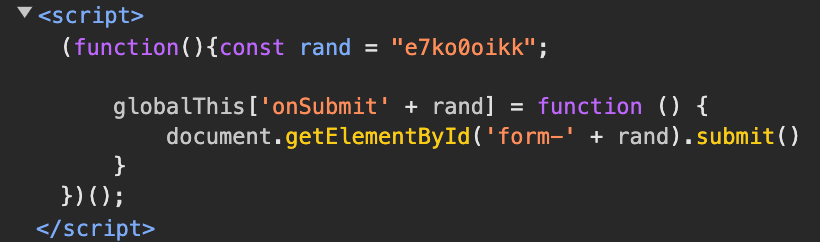
If I didn’t have the server-side generated part, I’d have to wrap it manually in an IIFE to avoid name clashes when the component is added to the page more than once.
And that’s exactly what happens under the hood in Astro: