Join the AI Workshop and learn to build real-world apps with AI. A hands-on, practical program to level up your skills.
The concept of prototype is a peculiar feature of the JavaScript language.
I’m going to wear the “old guy” hat here, and tell you that before 2015, we didn’t have classes in JavaScript. And we didn’t have the easy inheritance they provide.
But we could still implement some kind of inheritance using prototypes.
Now, you likely won’t use prototypes directly in your code, but that’s how JavaScript classes work under the hood, so it’s still something you should know as a JavaScript programmer.
Not to mention you need to understand when you read code that uses them.
Constructor functions
Before introducing prototypes, I need to introduce constructor functions.
In JavaScript we can use the new keyword to create objects with a function called a constructor function. It’s just a function that we use with new to create objects, like this:
function Car() {
  this.color = 'blue'
}
By convention, we use an uppercase letter to define the function, but it’s not mandatory
Remember constructors from when we talked about classes? It’s basically the same thing, but with a different syntax.
Now we can initialize new objects using the new keyword, like this:
const tesla = new Car()
const bmw = new Car()
Each of those objects points to a prototype
Every object in JavaScript has a prototype property that points to its prototype.
What is the prototype of tesla and bmw? It’s Car.prototype.
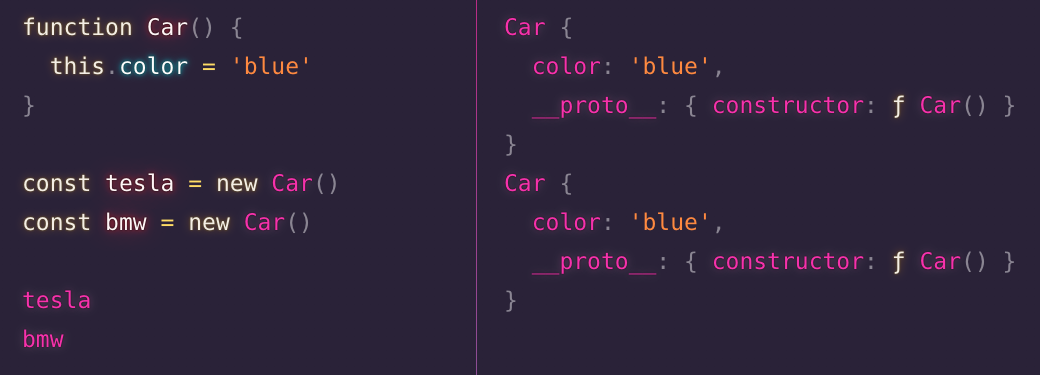
Both objects have the color property, as that’s set in the Car constructor.
See this special __proto__ property? That points to the object’s prototype.
What’s a prototype useful for?
Now here’s the fun part.
You can add other properties to the prototype:
function Car() {
  this.color = 'blue'
}

Car.prototype.owner = 'Flavio'
Now both objects have the owner property, too.
const tesla = new Car()
const bmw = new Car()

tesla.owner //'Flavio'
bmw.owner //'Flavio'
If you assign the owner property a new value in one object:
tesla.owner = 'test'The other object is independent:
bmw.owner //'Flavio'But if you set it like this:
tesla.__proto__.owner = 'test'then bmw.owner is test too.
So basically, Car.prototype is a common object that both instances inherit from.
Utility methods
JavaScript provides some utility methods to work with prototypes:
Object.getPrototypeOf(tesla) === Car.prototype //true

Car.prototype.isPrototypeOf(tesla) //true
And Object.prototype is in the prototype chain of Car (the constructor) as well:
Object.prototype.isPrototypeOf(Car)It is also the prototype of tesla and bmw, because it’s a chain:
Object.prototype.isPrototypeOf(tesla) //true
Object.prototype.isPrototypeOf(bmw) //true
Object.prototype is the prototype of Car.prototype, which is the prototype of tesla and bmw.
The chain ends at Object.prototype, which is the base for all objects.
An example with an array
If you initialize an array
const list = []its prototype is Array.prototype.
You can verify this by checking with the Object.getPrototypeOf() and the Object.prototype.isPrototypeOf() methods:
const list = []

Object.getPrototypeOf(list) === Array.prototype
Array.prototype.isPrototypeOf(list)
All the properties and methods of the prototype are available to the object that has that prototype.
Car.prototype has all the methods and properties provided by Object.prototype.
list has all the methods and properties provided by Array, plus all the methods and properties provided by Object, because Object.prototype is the base prototype of all objects:
Using prototypes to write more efficient code
One thing that is often mentioned when introducing prototypes is that if you have a constructor for an object with a method, like this:
function Car() {
  this.drive = () => {
  //do lots of expensive work
    console.log('drive!')
  }
}

const tesla = new Car()

tesla.drive()
and you expect to have many instances of that object, and that function is heavy, meaning it’s wasting memory, you can extract that method to the prototype:
function Car() {

}

Car.prototype.drive = () => {
  //do lots of expensive work
  console.log('drive!')
}

const tesla = new Car()

tesla.drive()
So instead of having 1000 functions for 1000 objects, JavaScript has just one on the prototype shared by those 1000 objects.
It’s not something I’ve done myself, as I don’t do any kind of highly intensive applications, and I think it’s premature optimization to focus on this kind of micro-optimization.
But it’s worth knowing you have this possibility.
Lessons in this unit:
| 0: | Introduction |
| 1: | Classes |
| 2: | Class methods |
| 3: | Private class properties |
| 4: | Constructors |
| 5: | Inheritance |
| 6: | ▶︎ Prototypes |