Join the AI Workshop and learn to build real-world apps with AI. A hands-on, practical program to level up your skills.
The geolocation object provides the following methods:
getCurrentPosition()watchPosition()clearWatch()
The first method returns the current position. Example:
navigator.geolocation.getCurrentPosition(() => {})The first time you call it, the browser prompts the user for permission to share location:
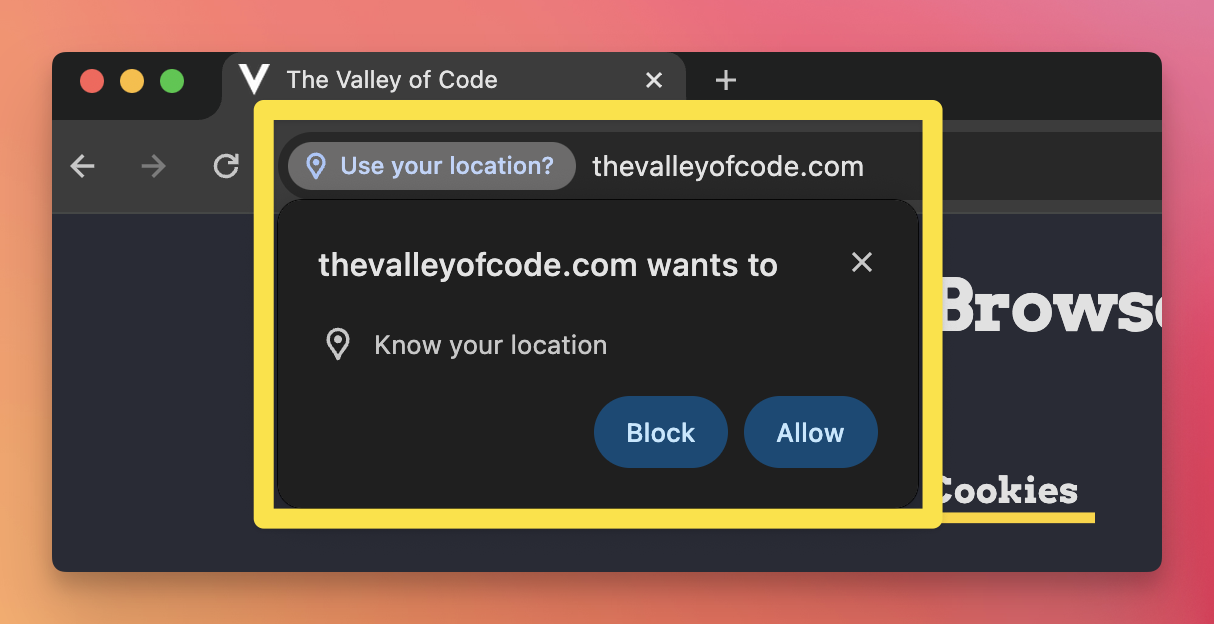
The user can allow or deny. You must pass a callback; an empty function is valid. The callback receives a Position object with the location data:
navigator.geolocation.getCurrentPosition(position => {
  console.log(position)
})
The Position object has two properties:
coords, aCoordinatesobjecttimestamp, the UNIX timestamp when the position was retrieved
The Coordinates object has these properties (values may be null depending on the device):
accuracy— accuracy of the position, in metersaltitude— altitude in metersaltitudeAccuracy— accuracy of the altitude, in metersheading— direction of travel in degrees (0 = North, 90 = East, 180 = South, 270 = West)latitude— latitudelongitude— longitudespeed— speed in meters per second
Depending on the device and browser, many of these may be null. On desktop (for example, Chrome), often only accuracy, latitude, and longitude are set.
navigator.geolocation.getCurrentPosition(position => {
  console.log(position.coords.latitude)
  console.log(position.coords.longitude)
})Lessons in this unit:
| 0: | Introduction |
| 1: | ▶︎ Getting the user's position |
| 2: | Watching the position for changes |
| 3: | If the user denies the position |
| 4: | Adding more options |