The border is a thin layer between padding and margin. Editing the border you can make elements draw their perimeter on screen.
You can work on borders by using those properties:
border-styleborder-colorborder-width
The property border can be used as a shorthand for all those properties.
border-radius is used to create rounded corners.
You also have the ability to use images as borders, an ability given to you by border-image and its specific separate properties:
border-image-sourceborder-image-sliceborder-image-widthborder-image-outsetborder-image-repeat
Let’s start with border-style.
The border style
The border-style property lets you choose the style of the border. The options you can use are:
dotted
dashedsoliddoublegrooveridgeinsetoutsetnonehidden
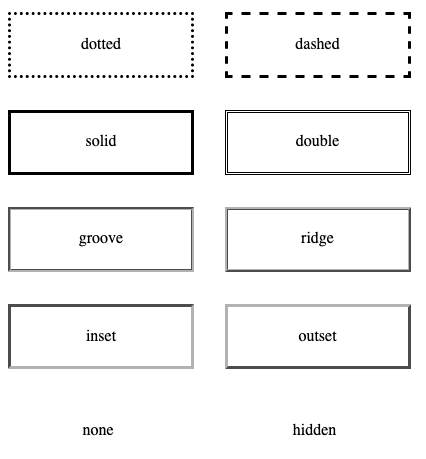
Check this Codepen for a live example
The default for the style is none, so to make the border appear at all you need to change it to something else. solid is a good choice most of the times.
You can set a different style for each edge using the properties
border-top-styleborder-right-styleborder-bottom-styleborder-left-style
or you can use border-style with multiple values to define them, using the usual Top-Right-Bottom-Left order:
p {
  border-style: solid dotted solid dotted;
}
The border width
border-width is used to set the width of the border.
You can use one of the pre-defined values:
thinmedium(the default value)thick
or express a value in pixels, em or rem or any other valid length value.
Example:
p {
  border-width: 2px;
}
You can set the width of each edge (Top-Right-Bottom-Left) separately by using 4 values:
p {
  border-width: 2px 1px 2px 1px;
}
or you can use the specific edge properties border-top-width, border-right-width, border-bottom-width, border-left-width.
The border color
border-color is used to set the color of the border.
If you don’t set a color, the border by default is colored using the color of the text in the element.
You can pass any valid color value to border-color.
Example:
p {
  border-color: yellow;
}
You can set the color of each edge (Top-Right-Bottom-Left) separately by using 4 values:
p {
  border-color: black red yellow blue;
}
or you can use the specific edge properties border-top-color , border-right-color , border-bottom-color , border-left-color .
The border shorthand property
Those 3 properties mentioned, border-width, border-style and border-color can be set using the shorthand property border.
Example:
p {
  border: 2px black solid;
}
You can also use the edge-specific properties border-top, border-right, border-bottom, border-left.
Example:
p {
  border-left: 2px black solid;
  border-right: 3px red dashed;
}
The border radius
border-radius is used to set rounded corners to the border. You need to pass a value that will be used as the radius of the circle that will be used to round the border.
Usage:
p {
  border-radius: 3px;
}
You can also use the edge-specific properties border-top-left-radius, border-top-right-radius, border-bottom-left-radius, border-bottom-right-radius.
Using images as borders
One very cool thing with borders is the ability to use images to style them. This lets you go very creative with borders.
We have 5 properties:
border-image-sourceborder-image-sliceborder-image-widthborder-image-outsetborder-image-repeat
and the shorthand border-image. I won’t go in much details here as images as borders would need a more in-depth coverage as the one I can do in this little chapter. I recommend reading the CSS Tricks almanac entry on border-image for more information.